• Polub nas na Facebooku!
  • (76) 862 94 30
  • al. Orła Białego 2, Legnica
Fundacja Ekologiczna "Zielona Akcja" Fundacja Ekologiczna "Zielona Akcja"
  • Aktualności
  • Projekty
    • W realizacji
    • Zrealizowane
    • Mapa inicjatyw
  • Oferta
  • Fundacja
    • Zespół
    • Dokumenty
    • Archiwum
  • Zamówienia publiczne
  • Baza wiedzy
    • Nasze publikacje
    • Nasze inicjatywy
  • Kontakt
Fundacja Ekologiczna "Zielona Akcja"

Rady seniorów wspierają przyjazną przestrzeń dla osób starszych

Strona główna Projekty W realizacji Rady seniorów wspierają przyjazną przestrzeń dla osób starszych Rady seniorów wspierają przyjazną przestrzeń dla osób starszych

Rady seniorów wspierają przyjazną przestrzeń dla osób starszych

Projekt „Rady seniorów wspierają przyjazną przestrzeń dla osób starszych” to inicjatywa realizowana od 1 lipca do 31.12.2025r., której celem jest wzrost kompetencji członków Rad Seniorów oraz aktywizacja osób starszych w procesie współtworzenia lokalnych rozwiązań dotyczących bezpiecznej, dostępnej i przyjaznej przestrzeni publicznej.

Projekt zakłada realne włączenie seniorów w diagnozowanie problemów, planowanie zmian oraz formułowanie rekomendacji dla samorządów, a także integrację i wzmocnienie środowisk osób 60+ w gminach wiejskich i miejsko-wiejskich Dolnego Śląska.

W działaniach projektowych uczestniczą Rady Seniorów z:

  • Lwówek Śląski

  • Niechlów

  • Janowice Wielkie

Cele projektu

Głównym celem projektu jest:

  • zwiększenie zaangażowania seniorów w życie lokalne i procesy decyzyjne,

  • rozwój kompetencji Rad Seniorów w zakresie pełnienia funkcji opiniodawczej, konsultacyjnej i inicjatywnej,

  • wspólne wypracowanie Map przyjaznej i bezpiecznej przestrzeni wraz z rekomendacjami dla samorządów,

  • integracja środowisk senioralnych oraz zmiana wizerunku osób starszych jako aktywnych współtwórców przestrzeni publicznej.

Realizacja działań projektowych

1. Spacery badawcze w przestrzeni gmin
Projekt rozpoczynają spotkania inicjujące z członkami Rad Seniorów, połączone ze spacerami badawczymi w terenie. Seniorzy – przy wsparciu architekta krajobrazu i moderatora – analizują dostępność architektoniczną i komunikacyjną wybranych miejsc, identyfikują bariery oraz wskazują możliwe do wdrożenia rozwiązania. Efektem działań są ankiety, dokumentacja fotograficzna oraz wnioski stanowiące podstawę dalszych prac.

2. Warsztaty szkoleniowe „Przyjazna przestrzeń dla Rad Seniorów”
Warsztaty przygotowują członków Rad Seniorów do skutecznego pełnienia ról konsultacyjnych, inicjatywnych i doradczych wobec samorządów. Uczestnicy zdobywają wiedzę z zakresu diagnozowania potrzeb seniorów, tworzenia rekomendacji, komunikacji, organizowania debat oraz wykorzystywania narzędzi internetowych. Istotnym elementem jest także wymiana doświadczeń i dobrych praktyk.

3. Debaty w formie kawiarenek senioralnych
W każdej z gmin organizowane są otwarte debaty z udziałem seniorów i przedstawicieli lokalnych instytucji. Spotkania odbywają się w przyjaznej, nieformalnej atmosferze i służą rozpoznaniu potrzeb osób starszych, dyskusji nad barierami w przestrzeni oraz wypracowaniu propozycji zmian. Ważnym elementem debat jest wspólne planowanie i podkreślanie roli planowania uniwersalnego.

4. Seniorzy realizują swoje pomysły w przestrzeni gmin
Na podstawie pomysłów wypracowanych podczas debat seniorzy planują i wdrażają konkretne, oddolne inicjatywy w przestrzeni publicznej. Mogą to być m.in. miejsca integracji, elementy małej architektury, nasadzenia zieleni czy rozwiązania poprawiające dostępność. Działania te wzmacniają poczucie sprawczości seniorów, uczą współpracy i integrują lokalne społeczności.

5. Podsumowanie projektu i rekomendacje dla samorządów
Kolejnym etapem są warsztaty ewaluacyjne, podczas których seniorzy podsumowują przebieg działań, prezentują efekty inicjatyw oraz wspólnie opracowują „Mapy przyjaznej przestrzeni”. Dokumenty te zawierają diagnozę barier, wnioski z debat i ankiet oraz dobre praktyki i rekomendacje, które mogą zostać wykorzystane przez samorządy w planowaniu rozwoju gmin.

6. Upowszechnianie i promocja projektu
Przez cały okres realizacji projektu prowadzone są działania informacyjne i promocyjne: aktualności na stronie internetowej, media społecznościowe, artykuły prasowe oraz wydanie broszury poświęconej dostępności architektonicznej i informacyjno-komunikacyjnej. Celem jest dotarcie do jak najszerszego grona seniorów i samorządów oraz upowszechnienie wypracowanych dobrych praktyk.

Efekty projektu

Projekt „Rady seniorów wspierają przyjazną przestrzeń dla osób starszych” przyczynia się do:

  • wzmocnienia roli Rad Seniorów w gminach,

  • aktywizacji i integracji setek osób starszych,

  • powstania praktycznych rekomendacji dla samorządów,

  • promocji planowania przestrzeni z udziałem mieszkańców,

  • tworzenia bezpieczniejszego, bardziej dostępnego i przyjaznego otoczenia dla seniorów.

To inicjatywa, w której doświadczenie i wiedza seniorów realnie wpływają na jakość lokalnej przestrzeni i życia społecznego.


Osoba odpowiedzialna:

Sylwia Szatan
e-mail: s.szatan@zielonaakcja.pl
tel. 602 698 772
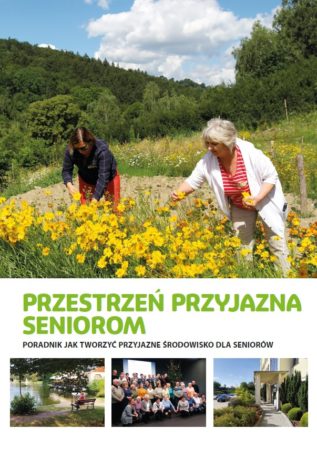
okładka seniorzy
Pobierz
Zapraszamy do pobrania i lektury publikacji, poświęconej tworzeniu bezpiecznej, dostępnej i przyjaznej przestrzeni dla osób starszych. Publikacja stanowi praktyczny poradnik dla samorządów, organizacji społecznych i mieszkańców, pokazując, jak projektować przestrzeń publiczną, mieszkaniową i zieloną w sposób sprzyjający samodzielności, integracji społecznej i aktywnemu starzeniu się.
Aktualności
Inicjatywa Rady Seniorów w Lwówku Śląskim 

Inicjatywa Rady Seniorów w Lwówku Śląskim 

Zielona Akcja 4 grudnia 2025
Warsztaty szkoleniowe “Przyjazna Przestrzeń dla Rad seniorów””

Warsztaty szkoleniowe “Przyjazna Przestrzeń dla Rad seniorów””

Zielona Akcja 29 listopada 2025
Debata „Bezpieczna przestrzeń dla seniorów” w Janowicach Wielkich

Debata „Bezpieczna przestrzeń dla seniorów” w Janowicach Wielkich

Zielona Akcja 28 listopada 2025
Zielone miejsce integracji tworzone przez seniorów w Janowicach Wielkich

Zielone miejsce integracji tworzone przez seniorów w Janowicach Wielkich

Zielona Akcja 24 listopada 2025
Debata o bezpiecznej przestrzeni dla osób starszych w Niechlowie

Debata o bezpiecznej przestrzeni dla osób starszych w Niechlowie

Zielona Akcja 18 listopada 2025
Nowa, przyjazna przestrzeń integracji w Sicinach

Nowa, przyjazna przestrzeń integracji w Sicinach

Zielona Akcja 28 października 2025
Warsztat planowania inicjatywy w Niechlowie

Warsztat planowania inicjatywy w Niechlowie

Zielona Akcja 17 października 2025
Debata „Bezpieczna przestrzeń dla seniora” podczas Dnia Lwóweckiego Seniora

Debata „Bezpieczna przestrzeń dla seniora” podczas Dnia Lwóweckiego Seniora

Zielona Akcja 7 października 2025
Warsztat planowania inicjatywy senioralnej w Janowicach Wielkich

Warsztat planowania inicjatywy senioralnej w Janowicach Wielkich

Zielona Akcja 5 października 2025
Załaduj więcej
Grantodawcy
dofinansowanie
Aktywni+_logo

Nawigacja

O projekcie

Publikacja

Aktualności

Grantodawcy

zielona-akcja-logo-2
Nawigacja
  • Aktualności
  • Projekty
    • W realizacji
    • Zrealizowane
    • Mapa inicjatyw
  • Oferta
  • Fundacja
    • Zespół
    • Dokumenty
    • Archiwum
  • Zamówienia publiczne
  • Baza wiedzy
    • Nasze publikacje
    • Nasze inicjatywy
  • Kontakt
Dane kontaktowe

Fundacja Ekologiczna “Zielona Akcja”
al. Orła Białego 2, 59-220 Legnica

Tel.: (76) 862 94 30

Kopiuj

Udogodnienia

Readable Experience

Lupa tekstowa
Czytelna czcionka
Highlight Links
Rozmiar czcionki
Domyślne
Ciemny kontrast
Jasny kontrast
Monochromia
Wysoki kontrast
Wysokie nasycenie
Niskie nasycenie
Ukryj obrazy
Maska do czytania
Highlight Hover
Duży ciemny kursor

Fundacja Ekologiczna "Zielona Akcja" Accessibility Statement

Accessibility Statement

  • zielonaakcja.pl
  • 2 February 2026

Compliance status

We firmly believe that the internet should be available and accessible to anyone, and are committed to providing a website that is accessible to the widest possible audience, regardless of circumstance and ability.

To fulfill this, we aim to adhere as strictly as possible to the World Wide Web Consortium’s (W3C) Web Content Accessibility Guidelines 2.1 (WCAG 2.1) at the AA level. These guidelines explain how to make web content accessible to people with a wide array of disabilities. Complying with those guidelines helps us ensure that the website is accessible to all people: blind people, people with motor impairments, visual impairment, cognitive disabilities, and more.

This website utilizes various technologies that are meant to make it as accessible as possible at all times. We utilize an accessibility interface that allows persons with specific disabilities to adjust the website’s UI (user interface) and design it to their personal needs.

Additionally, the website utilizes an AI-based application that runs in the background and optimizes its accessibility level constantly. This application remediates the website’s HTML, adapts Its functionality and behavior for screen-readers used by the blind users, and for keyboard functions used by individuals with motor impairments.

If you’ve found a malfunction or have ideas for improvement, we’ll be happy to hear from you. You can reach out to the website’s operators by using the following email

Screen-reader and keyboard navigation

Our website implements the ARIA attributes (Accessible Rich Internet Applications) technique, alongside various different behavioral changes, to ensure blind users visiting with screen-readers are able to read, comprehend, and enjoy the website’s functions. As soon as a user with a screen-reader enters your site, they immediately receive a prompt to enter the Screen-Reader Profile so they can browse and operate your site effectively. Here’s how our website covers some of the most important screen-reader requirements, alongside console screenshots of code examples:

  1. Screen-reader optimization: we run a background process that learns the website’s components from top to bottom, to ensure ongoing compliance even when updating the website. In this process, we provide screen-readers with meaningful data using the ARIA set of attributes. For example, we provide accurate form labels; descriptions for actionable icons (social media icons, search icons, cart icons, etc.); validation guidance for form inputs; element roles such as buttons, menus, modal dialogues (popups), and others. Additionally, the background process scans all of the website’s images and provides an accurate and meaningful image-object-recognition-based description as an ALT (alternate text) tag for images that are not described. It will also extract texts that are embedded within the image, using an OCR (optical character recognition) technology. To turn on screen-reader adjustments at any time, users need only to press the Alt+1 keyboard combination. Screen-reader users also get automatic announcements to turn the Screen-reader mode on as soon as they enter the website.

    These adjustments are compatible with all popular screen readers, including JAWS and NVDA.

  2. Keyboard navigation optimization: The background process also adjusts the website’s HTML, and adds various behaviors using JavaScript code to make the website operable by the keyboard. This includes the ability to navigate the website using the Tab and Shift+Tab keys, operate dropdowns with the arrow keys, close them with Esc, trigger buttons and links using the Enter key, navigate between radio and checkbox elements using the arrow keys, and fill them in with the Spacebar or Enter key.Additionally, keyboard users will find quick-navigation and content-skip menus, available at any time by clicking Alt+1, or as the first elements of the site while navigating with the keyboard. The background process also handles triggered popups by moving the keyboard focus towards them as soon as they appear, and not allow the focus drift outside of it.

    Users can also use shortcuts such as “M” (menus), “H” (headings), “F” (forms), “B” (buttons), and “G” (graphics) to jump to specific elements.

Disability profiles supported in our website

  • Epilepsy Safe Mode: this profile enables people with epilepsy to use the website safely by eliminating the risk of seizures that result from flashing or blinking animations and risky color combinations.
  • Visually Impaired Mode: this mode adjusts the website for the convenience of users with visual impairments such as Degrading Eyesight, Tunnel Vision, Cataract, Glaucoma, and others.
  • Cognitive Disability Mode: this mode provides different assistive options to help users with cognitive impairments such as Dyslexia, Autism, CVA, and others, to focus on the essential elements of the website more easily.
  • ADHD Friendly Mode: this mode helps users with ADHD and Neurodevelopmental disorders to read, browse, and focus on the main website elements more easily while significantly reducing distractions.
  • Blindness Mode: this mode configures the website to be compatible with screen-readers such as JAWS, NVDA, VoiceOver, and TalkBack. A screen-reader is software for blind users that is installed on a computer and smartphone, and websites must be compatible with it.
  • Keyboard Navigation Profile (Motor-Impaired): this profile enables motor-impaired persons to operate the website using the keyboard Tab, Shift+Tab, and the Enter keys. Users can also use shortcuts such as “M” (menus), “H” (headings), “F” (forms), “B” (buttons), and “G” (graphics) to jump to specific elements.

Additional UI, design, and readability adjustments

  1. Font adjustments – users, can increase and decrease its size, change its family (type), adjust the spacing, alignment, line height, and more.
  2. Color adjustments – users can select various color contrast profiles such as light, dark, inverted, and monochrome. Additionally, users can swap color schemes of titles, texts, and backgrounds, with over 7 different coloring options.
  3. Animations – epileptic users can stop all running animations with the click of a button. Animations controlled by the interface include videos, GIFs, and CSS flashing transitions.
  4. Content highlighting – users can choose to emphasize important elements such as links and titles. They can also choose to highlight focused or hovered elements only.
  5. Audio muting – users with hearing devices may experience headaches or other issues due to automatic audio playing. This option lets users mute the entire website instantly.
  6. Cognitive disorders – we utilize a search engine that is linked to Wikipedia and Wiktionary, allowing people with cognitive disorders to decipher meanings of phrases, initials, slang, and others.
  7. Additional functions – we provide users the option to change cursor color and size, use a printing mode, enable a virtual keyboard, and many other functions.

Browser and assistive technology compatibility

We aim to support the widest array of browsers and assistive technologies as possible, so our users can choose the best fitting tools for them, with as few limitations as possible. Therefore, we have worked very hard to be able to support all major systems that comprise over 95% of the user market share including Google Chrome, Mozilla Firefox, Apple Safari, Opera and Microsoft Edge, JAWS and NVDA (screen readers), both for Windows and for MAC users.

Notes, comments, and feedback

Despite our very best efforts to allow anybody to adjust the website to their needs, there may still be pages or sections that are not fully accessible, are in the process of becoming accessible, or are lacking an adequate technological solution to make them accessible. Still, we are continually improving our accessibility, adding, updating and improving its options and features, and developing and adopting new technologies. All this is meant to reach the optimal level of accessibility, following technological advancements. For any assistance, please reach out to